STATE SWITCH FEATURES

Everything behind the switch.

From simple product-state switching to live previews, catalogue tools, and Elementor integration, explore what StateSwitch can do across Free and Pro.

FREECore Switching Engine: Dual-state product imagery, archive grid switching, smooth crossfade transitions, and native WooCommerce gallery coexistence.
PROWorkflow & Atmosphere: Preview Studio, Atmosphere Engine, Catalogue Health dashboard, CSV tools with safety rollback, and Elementor integration.
SECTION 01/CORE ENGINE

Product Switching

The core dual-state engine that allows WooCommerce products to present two distinct states, synchronized across product displays with smooth visual transitions.

FREE CAPABILITYTwo visual states, one product

Two visual states, one product.

Add State A and State B imagery to the same WooCommerce product without creating duplicate product entries or complex variations. A single switch above or below your product grid changes the visible state of enabled products across the storefront.

  • Synchronizes visible products across the archive grid
  • Keeps both visual states on the existing product page
  • No duplicate WooCommerce product required
ARCHIVE PRODUCT DISPLAYReady
STATE A
Studio Packshot
Neutral daylight studio view
STATE B
In-Context Life
Lifestyle, lit, or in-context view
SPEED
Customizable
Adjustable duration in ms
Capabilities in Detail
FREEswitching

Dual-State Product Imagery

Add State A and State B imagery to the same WooCommerce product without creating duplicate product entries.

  • Two visual states, one product
  • Keeps both visual states on the existing product page
  • Directly uses images from your WordPress Media Library

FREEswitching

Storefront State Switching

A single switch changes the visible state of enabled products across the shop or archive page.

  • Synchronizes visible products across the archive grid
  • Smooth visual state transitions
  • Direct visual feedback for shoppers
FREEswitching

Smooth State Transitions

Crossfade transitions blend State A into State B smoothly without sudden jumps or visual disruption.

  • Crossfade transitions between State A and State B
  • Designed to keep the product layout stable while switching
  • Consistent presentation across catalog views
FREEswitching

Configurable Transition Duration

Adjust transition speed to match your store, from swift state switches to gradual fades.

  • Adjustable duration in milliseconds
  • Immediate visual preview in settings
  • Respects visitor reduced-motion preferences
FREEswitching

Tactile Switch Controls

Clean switch designs that invite shopper exploration while fitting naturally into your store layout.

  • Tactile switch handle with clear position
  • Custom labels for State A and State B
  • Distinct active and idle visual states
FREEswitching

Toggle Icons & Sizing

Include state icons inside the switch handle and adjust switch sizing to fit your shop layout.

  • Selectable state icons for State A and State B
  • Proportional size scaling options
  • Accessible keyboard focus indicators
FREEswitching

Automatic Storefront Placement

Place the storefront switch above or below product archive grids automatically in standard WooCommerce layouts.

  • Automatic placement for standard WooCommerce layouts
  • Positioned cleanly above or below product archives
  • Configurable default placement setting
PROswitching

Left, Center & Right Alignment

Position the switch cleanly across your storefront layout with dedicated alignment options.

  • Left, Center or Right alignment
  • Aligns with store navigation or product headers
  • Consistent placement across archive displays
PROswitching

Remembered Visitor State

Remember a visitor’s selected state in the browser as they browse through products.

  • Remember a visitor's selected state in the browser
  • Keeps the chosen visual state active across product views
  • Browser-based state memory without modifying user accounts
SECTION 02/ATMOSPHERE & GUIDANCE

Visual Experience

Adjust storefront visual mood. StateSwitch Pro provides bounded ambient styling, per-state surface tints, and gentle first-time visitor guidance.

Atmosphere
PRO ATMOSPHERE
STATE A · STUDIO VIEW
Oto Spun Brass Pendant daylight unlit (State A / Off)
LT-091 · LIGHTINGSculptural Brass Pendant
5000K Studio
SURFACE COLOR#FAF9F5 (Warm Chalk)
RADIANT GLOWNone (Neutral)
Live dual-state atmosphere preview demonstrating surface shifts and bounded ambient lighting.
PRO SHOWCASEAmbient Bounded Lighting

Atmosphere Engine & First-Time Guidance

When customers switch to an illuminated or evening state, Atmosphere shifts the underlying surface color and projects a radiant glow scoped to the StateSwitch product-image area.

  • Separate surface colors for State A and State B imagery
  • Separate Surface, Glow and Shadow settings for each state
  • First-time visitor tooltip cue guides shoppers to explore
Capabilities in Detail
PROvisual

Curated Visual Themes

Apply visual theme presets that harmonize switch borders, tracks, and labels with common eCommerce palettes.

  • Presets including Minimal Mono, Warm Earth, and Dark options
  • Fast preset selection in settings
  • Consistent switch styling across archive and product pages
PROvisual

Atmosphere Engine

Enhance the visual mood around your product imagery with state-dependent surface tints, soft shadows, and radiant glow.

  • Separate Surface, Glow and Shadow settings for each state
  • Highlights lighting, jewellery, beauty, and lifestyle photography
  • Scoped to the StateSwitch product-image area
PROvisual

Independent State Surface Colors

Set distinct background surface colors for State A and State B behind product photography.

  • Separate color settings for State A and State B
  • Useful for transparent PNGs and isolated cutouts
  • Transitions smoothly as the visitor toggles states
PROvisual

State-Specific Glow & Shadows

Add subtle shadow and radiant glow effects tailored independently to each state.

  • Separate Surface, Glow and Shadow settings for each state
  • Independent State A and State B visual styling
  • Scoped to the StateSwitch product-image area
PROvisual

First-Time Switch Helper

Display an informative tooltip cue to first-time visitors, guiding them to explore the switch.

  • Configurable helper text
  • Disappears after the visitor first interacts with the switch
  • Remembers when a visitor has already used the switch
PROvisual

Per-Product Helper Targeting

Choose whether the helper cue appears on specific spotlight products or follows store defaults.

  • Options: Use Global, Always Show, or Never Show
  • Configurable per product in WooCommerce product settings
  • Focuses guidance on products where demonstration helps most
SECTION 03/PREVIEW STUDIO

Preview & Design

Test, refine, and preview your switch styles, transitions, and Atmosphere parameters before applying them to your storefront.

PRO SHOWCASEStorefront Preview

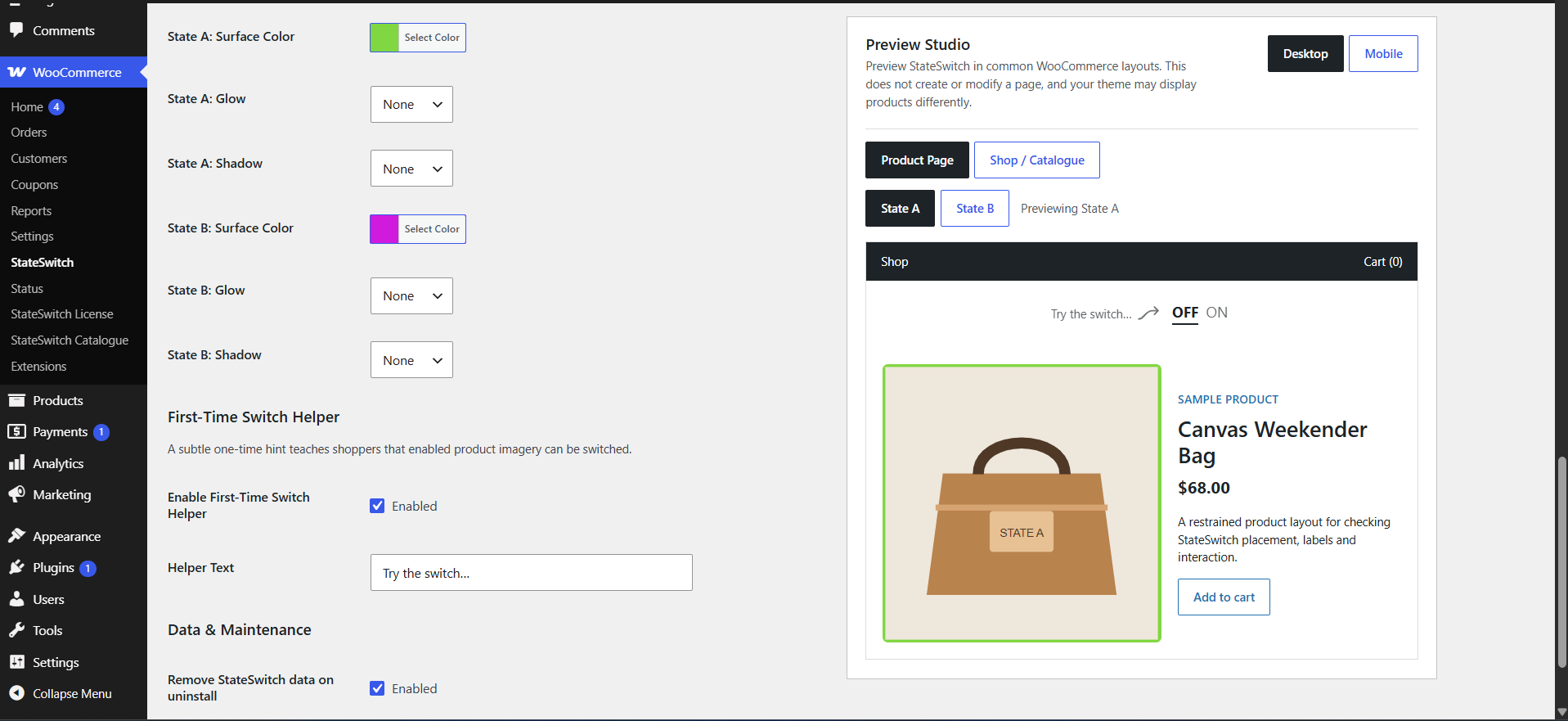
Preview Studio: Storefront Preview

Preview Studio allows you to test switch behavior directly in WordPress. Inspect real products across desktop and mobile preview modes, evaluate transitions, and preview unsaved settings before applying them to your live storefront.

  • Switch between desktop and mobile preview modes
  • Inspect single product page and archive grid layouts
  • Preview unsaved settings before publishing to the storefront
Preview Studio
PRO PREVIEW
StateSwitch Pro Preview Studio interface showing live storefront preview controls with desktop and mobile viewport testing and real product imagery.
Live administrative preview canvas showing desktop and mobile layouts with real product imagery.
Capabilities in Detail
PROpreview

Preview Studio

A dedicated administrative preview to inspect switch transitions, themes, and layouts before applying changes to the storefront.

  • Preview changes before applying them to the storefront
  • Immediate visual feedback while adjusting settings
  • Interactive switch preview inside WordPress admin
PROpreview

Single Product Page Preview

Inspect how the switch and Atmosphere appear with primary product imagery on single product pages.

  • Single product view preview
  • Inspect switch placement and product-image presentation
  • Displays helper cue in product layout context
PROpreview

Shop & Archive Grid Preview

Preview multi-column catalogue grids with live switching to evaluate how products appear together.

  • Preview multi-product archive grids
  • Verify switch placement above or below product cards
  • Evaluate overall visual balance across collections
PROpreview

Desktop & Mobile Viewport Toggles

Switch between desktop and mobile preview modes inside Preview Studio to inspect responsive layouts.

  • Switch between desktop and mobile preview modes
  • Check switch sizing and touch target presentation
  • Preview without manually resizing your browser window
PROpreview

Live Unsaved-Setting Testing

Adjust switch themes, timings, and Atmosphere parameters to preview them before saving.

  • Preview unsaved settings before publishing
  • Apply changes to the live store only when satisfied
  • Reset preview controls to restore current settings
PROpreview

Independent State Presentation Preview

Lock the preview canvas to inspect State A or State B in isolation.

  • Inspect State A and State B presentation separately
  • Review state-specific surface and lighting settings
  • Evaluate each visual state individually
SECTION 04/INVENTORY HEALTH

Catalogue Management

Review your inventory for dual-state completeness. Discover missing secondary assets, detect broken image URLs, and update multiple products together.

Catalogue Health
PRO CATALOGUE
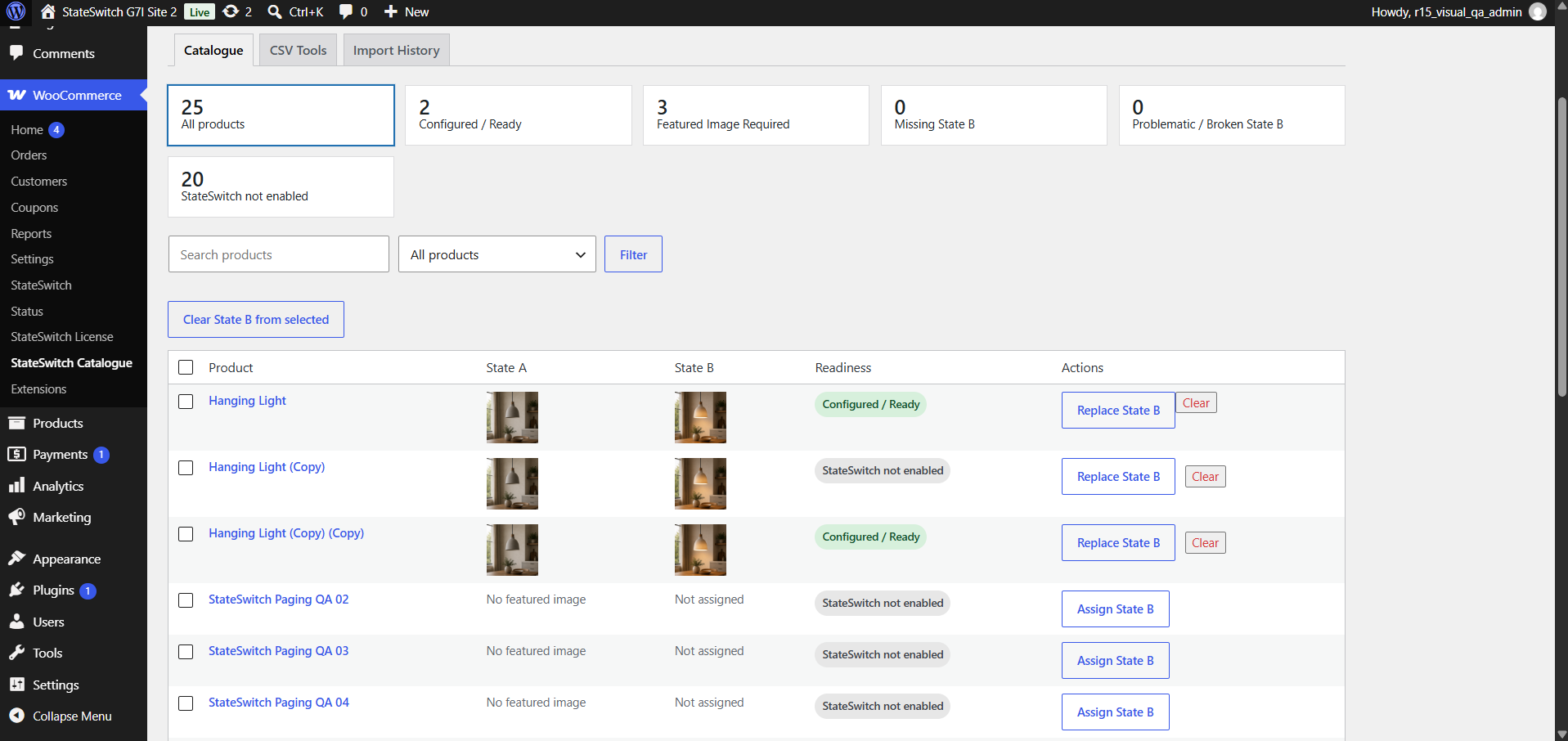
StateSwitch Pro Catalogue Health dashboard displaying product status indicators for Ready, Missing, and Broken secondary assets with bulk action tools.
StateSwitch Pro Catalogue Manager displaying Ready, Missing, and Broken asset status with quick filters.
PRO SHOWCASEHealth & Bulk Actions

Catalogue Health & Bulk Management

Managing dual states across your catalogue requires clear visibility. The Catalogue Health dashboard categorizes your inventory into Ready, Missing, Broken, and Not Enabled, while bulk tools let you assign or clear secondary images across selected products.

  • Status indicators: Ready, Missing, Broken, and Not Enabled
  • Assign or clear State B images across selected products
  • Search by product keyword or SKU with clean pagination
Capabilities in Detail
PROcatalogue

Catalogue Health Dashboard

An administrative dashboard that scans your WooCommerce catalogue and classifies products by dual-state readiness.

  • Clear readiness breakdown across catalogue items
  • Identifies products that need secondary photography
  • Detects missing or detached State B images
PROcatalogue

Ready Status Verification

Identifies products with valid State A and State B media configured, ready to switch on the storefront.

  • Count of storefront-ready products
  • Filter to view ready merchandise
  • Direct link to inspect product settings
PROcatalogue

Missing State B Asset Filter

Isolate products that have a featured image but lack a secondary State B asset.

  • Filter to locate products lacking State B assets
  • Actionable list to plan secondary photography
  • Quick navigation to edit incomplete products
PROcatalogue

Broken & Detached Asset Detection

Identifies products whose configured State B image is missing or no longer resolves to a valid Media Library attachment.

  • Identifies missing or unresolved State B media attachments
  • Helps prevent broken imagery on the storefront
  • Enables prompt re-assignment from the Media Library
PROcatalogue

Bulk State B Management

Select multiple products to assign, replace, or clear secondary State B images in a single administrative action.

  • Assign or update secondary images across selected products in bulk
  • Clear secondary states across selected items
  • Saves time when updating multiple product records
PROcatalogue

Search, Filter & Pagination

Find products using search, filter by StateSwitch health status, and navigate larger catalogues with pagination.

  • Search catalogue products
  • Filter by Ready, Missing, Broken or Not Enabled
  • Paginated catalogue management
SECTION 05/SPREADSHEET WORKFLOWS

CSV & Operations

Structured spreadsheet workflows designed for reliability. Export clean human-readable CSVs, run pre-flight dry runs before importing, and review import history with safety rollback.

PRO SHOWCASESafe Batch Operations

Dry-Run Validation & Rollback History

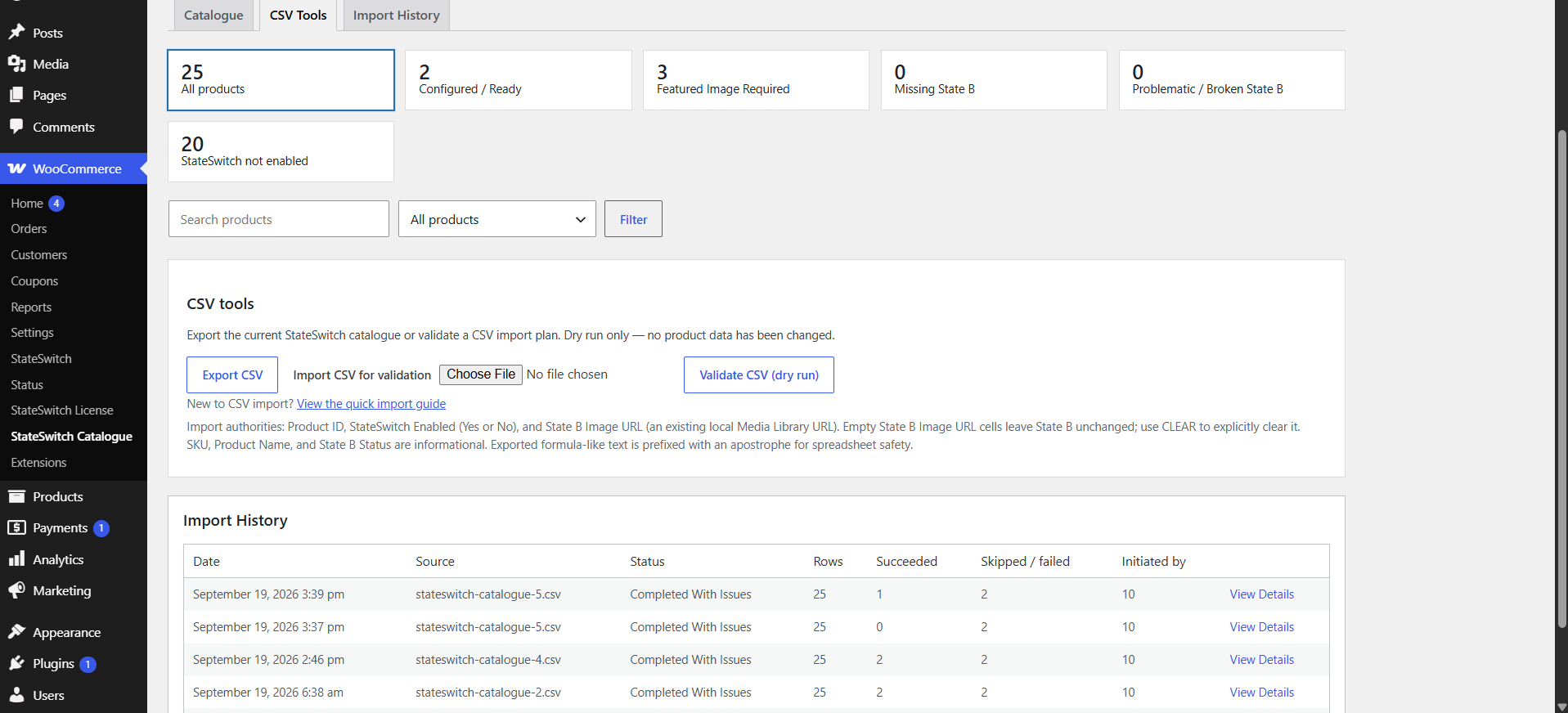
Import spreadsheet data with confidence. StateSwitch Pro validates your CSV with a dry-run check that identifies updated, skipped, and invalid rows before changes are applied. Import history records each run and allows you to safely roll back eligible changes.

  • Pre-flight validation identifies changes before applying updates
  • Explicit CLEAR syntax safely removes secondary images
  • Import history with recorded changes and safety rollback
CSV Operations
PRO CSV
StateSwitch Pro CSV Operations interface displaying spreadsheet import validation, dry-run change summaries, and import history with safety rollback.
Controlled CSV import interface showing pre-flight validation, change summaries, and import rollback history.
Capabilities in Detail
PROcsv

Catalogue CSV Export

Export your StateSwitch catalogue with product details, enabled status, State B image URLs and State B status.

  • Export catalogue products with a single click
  • Includes Product ID, SKU, Product Name, StateSwitch Enabled, State B Image URL, and State B Status
  • Standard CSV format for spreadsheet workflows
PROcsv

Human-Readable Spreadsheet Values

Uses straightforward "Yes" and "No" columns and plain image URLs for clear spreadsheet editing.

  • Straightforward "Yes" and "No" enabled columns
  • Plain State B Image URL fields
  • Designed for clear review by store administrators
PROcsv

Dry-Run Import Validation

Simulate spreadsheet imports before applying changes to review which products will be updated, skipped, or modified.

  • Pre-flight validation identifies invalid or unresolved rows before changes are applied
  • Summary table of detected changes
  • Dry-run validation checks data without modifying the store
PROcsv

Controlled Import & CLEAR Syntax

Apply validated imports with confidence. Use the explicit "CLEAR" keyword to safely remove State B assets from selected products.

  • Updates apply only to specified fields
  • Explicit "CLEAR" keyword prevents accidental removal
  • Processes rows in controlled import sequences
PROcsv

Media Library URL Resolution

Use an existing image URL from the site's WordPress Media Library; StateSwitch associates the image with the product.

  • Uses existing image URLs from your WordPress Media Library
  • Associates existing media library images with products
  • Unresolved Media Library URLs are reported before changes are applied
PROcsv

Import History & Safety Rollback

CSV imports are recorded with timestamp and row count, with the option to safely roll back eligible changes.

  • Import history with recorded changes and outcomes
  • Recorded log of modified products per import job
  • Review import history and safely roll back eligible changes
SECTION 06/ECOSYSTEM

Integrations & Compatibility

Designed to preserve WooCommerce's native gallery, zoom, and lightbox, while providing dedicated Elementor widget integration for custom templates.

Elementor Panel
PRO ELEMENTOR
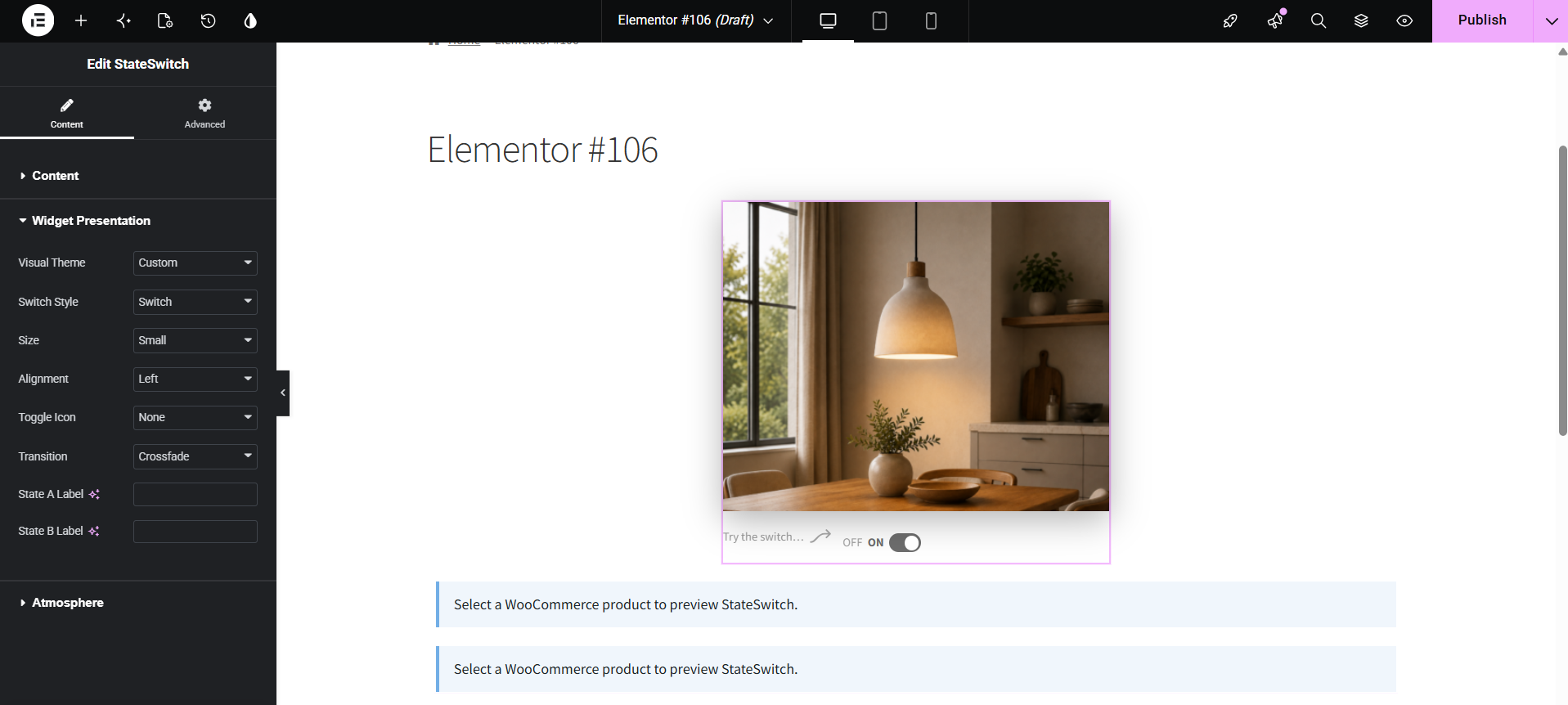
StateSwitch widget configuration panel inside the Elementor editor showing layout, alignment, and visual presentation controls.
StateSwitch widget inside the Elementor editor with visual styling, alignment, and Atmosphere controls.
PRO SHOWCASEVisual Page Builder

Dedicated Elementor Widget

Place the StateSwitch widget into Elementor layouts and configure its presentation visually. Control alignment, sizing, and Atmosphere integration directly from the Elementor visual panel.

  • Dedicated StateSwitch Elementor widget
  • Visual alignment and presentation controls
  • Atmosphere and first-time helper integration
Capabilities in Detail
FREEintegrations

Native Zoom & Lightbox Synchronization

Keep WooCommerce’s gallery zoom and lightbox active; switching states updates the active image accordingly.

  • Supports standard hover zoom on both states
  • Updates lightbox modal image when switching states
  • Preserves native image viewing interactions
FREEintegrations

Responsive Mobile Optimization

Designed for touchscreens with comfortable touch targets and smooth visual transitions.

  • Touch-friendly tap targets for mobile visitors
  • Designed to prevent horizontal overflow on mobile screens
  • Utilizes standard responsive image srcset attributes
FREEintegrations

Shop & Category Archive Support

Works with standard WooCommerce product loops, category archives, and search result pages.

  • Integration with standard WooCommerce archive loops
  • Consistent state switching across product cards
  • Works with standard WooCommerce archive navigation
PROintegrations

Dedicated Elementor Widget

Place the StateSwitch widget into Elementor layouts and configure its presentation visually.

  • Dedicated StateSwitch Elementor widget
  • Visual alignment and presentation controls
  • State A / State B switching
  • Atmosphere integration
  • First-Time Helper integration
PROintegrations

Elementor Presentation Controls

Customize switch alignment, scale, and styling directly from Elementor’s visual settings panel.

  • Alignment controls: Left, Center, Right
  • Switch sizing and presentation options
  • Visual settings inside the Elementor panel
PROintegrations

Elementor Atmosphere & Helper Sync

Coordinate Atmosphere styling and first-time helper cues within Elementor product templates.

  • Connects Atmosphere styling to product image containers
  • Helper tooltip aligns with the StateSwitch control
  • Designed to work within Elementor product layouts
CAPABILITY COMPARISON

Free vs Pro Capabilities

StateSwitch Free provides complete, production-ready dual-state switching. StateSwitch Pro expands visual atmosphere, administrative previewing, catalogue management, CSV workflows, and Elementor page building.

Capability
Freecore
Proexpanded
Core Dual-State Product Imagery
Storefront State Switching
Smooth State Transitions
Transition Duration Control
Tactile Switch Controls & Icons
Automatic Storefront Placement
Left, Center & Right Alignment Controls
Remembered Visitor State in Browser
Curated Visual Themes (Minimal, Earth, Dark)
Atmosphere Engine (Surface, Glow & Shadow)
Independent State Surface Colors
State-Specific Glow & Shadows
First-Time Switch Helper Tooltip
Per-Product Helper Targeting
Administrative Preview Studio
Single Product & Archive Grid Previews
Desktop & Mobile Preview Modes
Live Unsaved-Setting Testing
Catalogue Health Dashboard
Ready, Missing & Broken Asset Filters
Bulk State B Management
Catalogue CSV Export
Pre-Flight Dry-Run Import Validation
Controlled Import Execution & CLEAR Syntax
Import History & Safety Rollback
WooCommerce Gallery, Zoom & Lightbox Compatibility
Shop & Archive Loop Support
Dedicated Elementor Widget
Elementor Alignment & Presentation Controls
Ready to expand your store? StateSwitch Free covers complete core switching. StateSwitch Pro adds Preview Studio, visual tools, catalogue management, CSV workflows, Elementor integration, updates and support.
START TODAY

Ready for more control?

Use StateSwitch Free for the core switching experience, or unlock the complete workflow with StateSwitch Pro.

Works with standard WooCommerceSimple, non-destructive setup